
Table of Contents
ToggleIn this Post
We’ll be exploring how to implement a Read-only schema for Oracle EBS APPS user. There are many ways we can perform the read-only apps schema creation, but this method is tested in many different environments and working as expected. Let’s explore…
EBS Application Version: R12.2
EBS Schema/User: APPS
Check the Invalid Objects
Before creating apps read only schema verify the invalid objects details for the specific schema/user.
sqlplus / as sysdba
alter session set container=DEMO;
show con_name
conn apps@DEMO
show user
spool invalid_objs_bfr_activity_06JUL26.log
select owner, object_name from all_objects where status='INVALID';
spool off
[oracle@DBSRV ~]$ sqlplus / as sysdba

SQL*Plus: Release 19.0.0.0.0 - Production on Mon Jul 6 13:09:02 2026
Version 19.30.0.0.0

Copyright (c) 1982, 2024, Oracle.  All rights reserved.


Connected to:
Oracle Database 19c Enterprise Edition Release 19.0.0.0.0 - Production
Version 19.30.0.0.0

SQL> alter session set container=DEMO;

Session altered.

SQL> show con_name

CON_NAME
------------------------------
DEMO

SQL> conn apps@DEMO
Connected.

SQL> show user
USER is "APPS"

SQL> spool invalid_objs_bfr_activity_06JUL26.log
SQL> select object_name from all_objects where status='INVALID';

OBJECT_NAME
--------------------------------------------------------------------------------
SQLT$A
SQLT$D
CSD_EID_REPAIRS_INCR_V
CSD_EID_REPAIRS_V
CSD_EID_SW_CLAIM_LINES_V
CUSTOMER_THIRD_PARTY_REG
PO_ENDECA_SUPPLIER_ANALYSIS_V
PO_ENDECA_SUPP_ANALYSIS_INC_V
PO_LOCATION
WMS_EPC_PVT
XLA_AAD_MERGE_ANALYSIS_PVT

11 rows selected.

SQL> spool off

SQL> exit
Disconnected from Oracle Database 19c Enterprise Edition Release 19.0.0.0.0 - Production
Version 19.30.0.0.0
Creating a User and Grant User Privileges
First, create APPSREAD user and produce a script to grant privileges.
sqlplus / as sysdba
spool usr_create_provide_grants_06JUL26.log
set time on
show con_name
show pdbs
create user APPSREAD identified by <password>;
grant connect to APPSREAD;
grant create session to APPSREAD;
grant alter session to APPSREAD;
spool off
[oracle@DBSRV ~]$ sqlplus / as sysdba

SQL*Plus: Release 19.0.0.0.0 - Production on Mon Jul 6 23:09:02 2026
Version 19.30.0.0.0

Copyright (c) 1982, 2024, Oracle.  All rights reserved.


Connected to:
Oracle Database 19c Enterprise Edition Release 19.0.0.0.0 - Production
Version 19.30.0.0.0

SQL> spool usr_create_provide_grants_06JUL26.log

SQL> set time on
23:09:42 SQL> show con_name

CON_NAME
------------------------------
CDB$ROOT
23:09:50 SQL> show pdbs

    CON_ID CON_NAME                       OPEN MODE  RESTRICTED
---------- ------------------------------ ---------- ----------
         2 PDB$SEED                       READ ONLY  NO
         3 DEMO                           READ WRITE NO
23:09:52 SQL> alter session set container=DEMO;

Session altered.

23:10:00 SQL> create user APPSREAD identified by password;

User created.

23:10:50 SQL> grant connect to APPSREAD;

User created.

23:11:55 SQL> grant create session to APPSREAD;

Grant succeeded.

23:12:01 SQL> grant alter session to APPSREAD;

Grant succeeded.

23:12:09 SQL> spool off
Prepare APPS Schema Privileges Grant Script
Follow the below steps and prepare the script for executing in the newly created schema. In the same session execute the below commands to generate “grant_privs.sql”
Read privilege have been assigned to every object in the APPS schema for the newly created APPSREAD user.
SET echo off
SET feedback off
SET term off
SET pagesize 0
SET linesize 300
SET newpage 0
SET space 0
spool grant_privs.sql
select 'exec AD_ZD.GRANT_PRIVS(''READ'','''||VIEW_NAME || ''', ''APPSREAD'');' from all_views where OWNER in ('APPS') and view_NAME not like '%/%';
select 'exec AD_ZD.GRANT_PRIVS(''READ'','''||table_NAME || ''', ''APPSREAD'');' from all_tables where OWNER in ('APPS') and table_NAME not like '%/%';
select 'exec AD_ZD.GRANT_PRIVS(''READ'','''||SYNONYM_NAME || ''', ''APPSREAD'');' from all_synonyms syns, all_objects objs where syns.OWNER in ('APPS') and syns.SYNONYM_NAME not like '%/%' and syns.table_owner=objs.owner and syns.table_name=objs.object_name and objs.object_type in ('TABLE','VIEW');
spool off
exit
Note:
- Output not recorded as there are n number of lines.
- Remove the unwanted lines in the generated spool(sql) file if any. Now we have the grant_privs.sql file ready for next step.
Assign Grants to APPSREAD user
[applmgr@APPSRV ~]$ sqlplus apps/apps_password

SQL*Plus: Release 19.0.0.0.0 - Production on Mon Jul 6 23:20:06 2026
Version 19.30.0.0.0

Copyright (c) 1982, 2024, Oracle.  All rights reserved.


Connected to:
Oracle Database 19c Enterprise Edition Release 19.0.0.0.0 - Production
Version 19.30.0.0.0

SQL> show user
USER is "APPS"

SQL> set time on

23:21:04 SQL> spool grant_execution.log

23:21:20 SQL> @grant_privs.sql

PL/SQL procedure successfully completed.


PL/SQL procedure successfully completed.


PL/SQL procedure successfully completed.


PL/SQL procedure successfully completed.

.
.
.
PL/SQL procedure successfully completed.

23:34:07 SQL> spool off
We may face some error as below, review the details rerun/ignore.
BEGIN AD_ZD.GRANT_PRIVS('READ','AD_OBJECTS', 'APPSREAD'); END;

*
ERROR at line 1:
ORA-01720: grant option does not exist for 'SYS.DBA_OBJECTS_AE'
ORA-06512: at "APPS.AD_ZD", line 1375
ORA-06512: at "SYS.DBMS_SQL", line 1177
ORA-06512: at "APPS.AD_ZD", line 1358
ORA-06512: at line 1

BEGIN AD_ZD.GRANT_PRIVS('READ','DDR_SV_ORDR_C_MV#', 'APPSREAD'); END;

*
ERROR at line 1:
ORA-01403: no data found
ORA-06512: at "APPS.AD_ZD", line 1375
ORA-06512: at "APPS.AD_ZD_TABLE", line 134
ORA-06512: at "APPS.AD_ZD", line 1323
ORA-06512: at line 1
Perform Custom Schema Registration
Run ADZDREG.sql from the same apps sql session.
spool adzdreg.log
@$AD_TOP/patch/115/sql/ADZDREG.sql apps <apps_password> APPSREAD
spool off
23:34:13 SQL> spool adzdreg.log

23:34:36 SQL> @$AD_TOP/patch/115/sql/ADZDREG.sql apps apps_password APPSREAD
Connected.

PL/SQL procedure successfully completed.


PL/SQL procedure successfully completed.


PL/SQL procedure successfully completed.


PL/SQL procedure successfully completed.


APPS_DDL packages are installed in APPSREAD schema


Commit complete.

23:35:07 SQL> spool off
Recompile Invalid Objects
spool invalid_recompile.log
@/a01/DEMO/R122/fs1/EBSapps/appl/ad/12.0.0/sql/adutlrcmp.sql
spool off
23:35:44 SQL> spool invalid_recompile.log

23:36:02 SQL> @/a01/DEMO/R122/fs1/EBSapps/appl/ad/12.0.0/sql/adutlrcmp.sql


Session Information:

INSTANCE_NAME    SCHEMA_NAME     EDITION_NAME    SYSDATE
---------------- --------------- --------------- ----------------
CDBDEMO          APPS            V_20260322_2248 2026-07-06 23:36


Invalid Objects per Owner (before compile):

OWNER                              ACTUAL       STUB      TOTAL
------------------------------ ---------- ---------- ----------
APPS                                    9          0          9


Compiling Objects...

PL/SQL procedure successfully completed.

Elapsed: 00:00:07.02

Invalid Objects per Owner (after compile):

OWNER                              ACTUAL       STUB      TOTAL
------------------------------ ---------- ---------- ----------
APPS                                    9          0          9


Commit complete.

23:37:19 SQL> spool off
Assign Additional Grants
spool more_grants.log
exec AD_ZD.GRANT_PRIVS('EXECUTE','MO_GLOBAL','APPSREAD');
exec AD_ZD.GRANT_PRIVS('EXECUTE','FND_GLOBAL','APPSREAD');
exec AD_ZD.GRANT_PRIVS('READ','MO_GLOB_ORG_ACCESS_TMP','APPSREAD');
spool off
23:38:21 SQL> spool more_grants.log

23:38:26 SQL> exec AD_ZD.GRANT_PRIVS('EXECUTE','MO_GLOBAL','APPSREAD');

PL/SQL procedure successfully completed.

23:38:29 SQL> exec AD_ZD.GRANT_PRIVS('EXECUTE','FND_GLOBAL','APPSREAD');

PL/SQL procedure successfully completed.

23:38:33 SQL> exec AD_ZD.GRANT_PRIVS('READ','MO_GLOB_ORG_ACCESS_TMP','APPSREAD');

PL/SQL procedure successfully completed.

23:38:37 SQL> spool off
Re-Check the Invalid Objects
After creating new apps read only schema verify the invalid objects details and compare with the initial results.
sqlplus / as sysdba
alter session set container=DEMO;
show con_name
conn apps@DEMO
show user
spool invalid_objs_afr_activity_06JUL26.log
select owner, object_name from all_objects where status='INVALID';
spool off
[oracle@DBSRV ~]$ sqlplus / as sysdba

SQL*Plus: Release 19.0.0.0.0 - Production on Mon Jul 6 23:42:21 2026
Version 19.30.0.0.0

Copyright (c) 1982, 2024, Oracle.  All rights reserved.


Connected to:
Oracle Database 19c Enterprise Edition Release 19.0.0.0.0 - Production
Version 19.30.0.0.0

SQL> alter session set container=DEMO;

Session altered.

SQL> show con_name

CON_NAME
------------------------------
DEMO

SQL> conn apps@DEMO
Connected.

SQL> show user
USER is "APPS"

SQL> spool invalid_objs_afr_activity_06JUL26.log
SQL> select object_name from all_objects where status='INVALID';

OBJECT_NAME
--------------------------------------------------------------------------------
SQLT$A
SQLT$D
CSD_EID_REPAIRS_INCR_V
CSD_EID_REPAIRS_V
CSD_EID_SW_CLAIM_LINES_V
CUSTOMER_THIRD_PARTY_REG
PO_ENDECA_SUPPLIER_ANALYSIS_V
PO_ENDECA_SUPP_ANALYSIS_INC_V
PO_LOCATION
WMS_EPC_PVT
XLA_AAD_MERGE_ANALYSIS_PVT

11 rows selected.

SQL> spool off

SQL> exit
Disconnected from Oracle Database 19c Enterprise Edition Release 19.0.0.0.0 - Production
Version 19.30.0.0.0
Create Logon Trigger
After created the user, sign in as APPSREAD and do some initial testing by accessing tables using apps.* tables.
Unfortunately, so far it is still necessary to do all selects with an “apps.” prefixed.
This can be solved with two approaches:
- Create a synonym in APPSREAD for each APPS object. (Complex, additional steps required to be performed)
- Create a logon trigger that changes the CURRENT_SCHEMA. (Easy, very minimal steps to be performed)
sqlplus / as sysdba
spool trigger_creation.log
alter session set container=DEMO;
spool off
Create Trigger as follows:
create or replace TRIGGER APPSREAD.appsread_query_logon_trg
AFTER logon ON APPSREAD.SCHEMA
DECLARE
BEGIN
EXECUTE IMMEDIATE 'ALTER SESSION SET CURRENT_SCHEMA=APPS';
END;
/
[oracle@DBSRV ~]$ sqlplus / as sysdba

SQL*Plus: Release 19.0.0.0.0 - Production on Mon Jul 6 23:49:02 2026
Version 19.30.0.0.0

Copyright (c) 1982, 2024, Oracle.  All rights reserved.


Connected to:
Oracle Database 19c Enterprise Edition Release 19.0.0.0.0 - Production
Version 19.30.0.0.0

SQL> show con_name

CON_NAME
------------------------------
CDB$ROOT
SQL> show pdbs

    CON_ID CON_NAME                       OPEN MODE  RESTRICTED
---------- ------------------------------ ---------- ----------
         2 PDB$SEED                       READ ONLY  NO
         3 DEMO                           READ WRITE NO
SQL> alter session set container=DEMO;

Session altered.

SQL> set time on
SQL> create or replace TRIGGER APPSREAD.appsread_query_logon_trg
  2  AFTER logon ON APPSREAD.SCHEMA
  3  DECLARE
  4  BEGIN
  5  EXECUTE IMMEDIATE 'ALTER SESSION SET CURRENT_SCHEMA=APPS';
  6  END;
  7  /

Trigger created.

SQL> spool off
Test the User Privileges
Execute the following statements to test the APPSREAD user privileges.
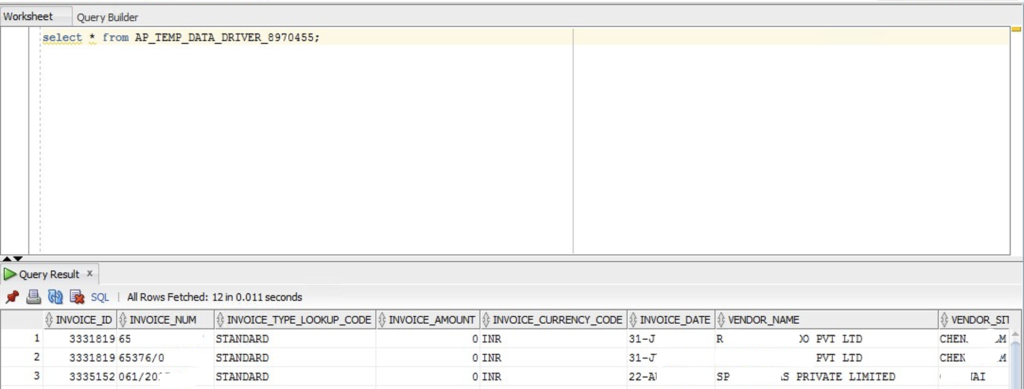
- Select Table
- select * from AP_TEMP_DATA_DRIVER_8970455;
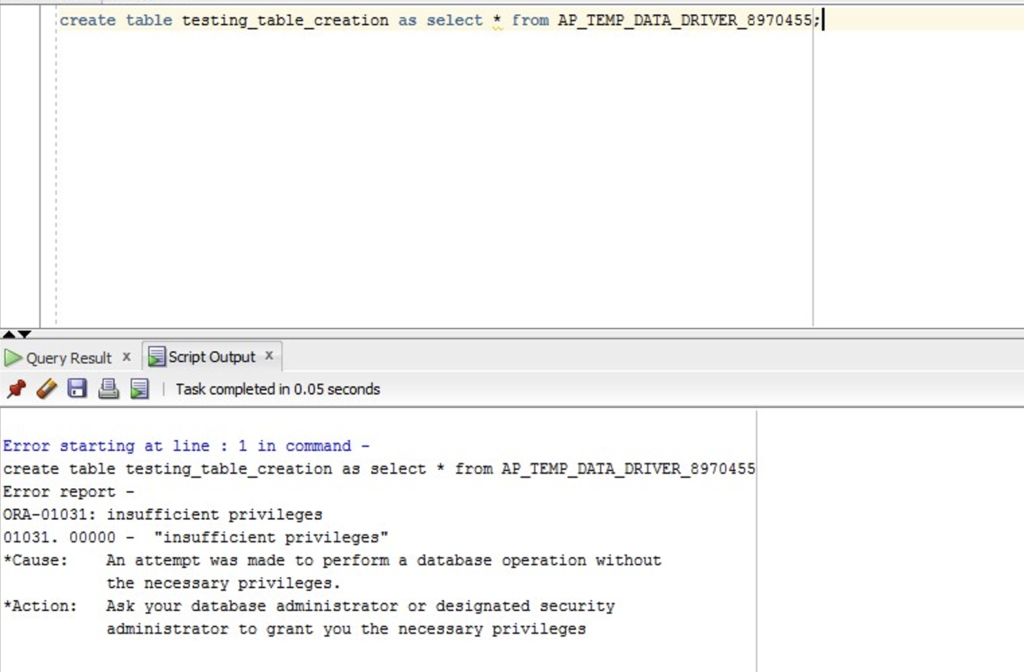
- Create Table
- create table testing_table_creation as select * from AP_TEMP_DATA_DRIVER_8970455;
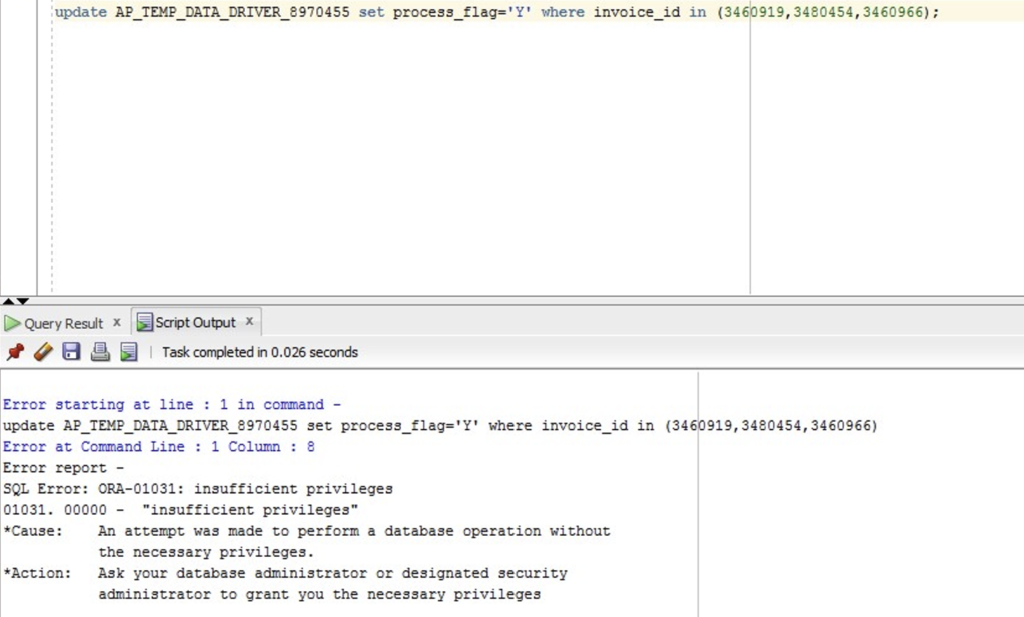
- Update Table
- update AP_TEMP_DATA_DRIVER_8970455 set process_flag='Y' where invoice_id in (3460919,3480454,3460966);
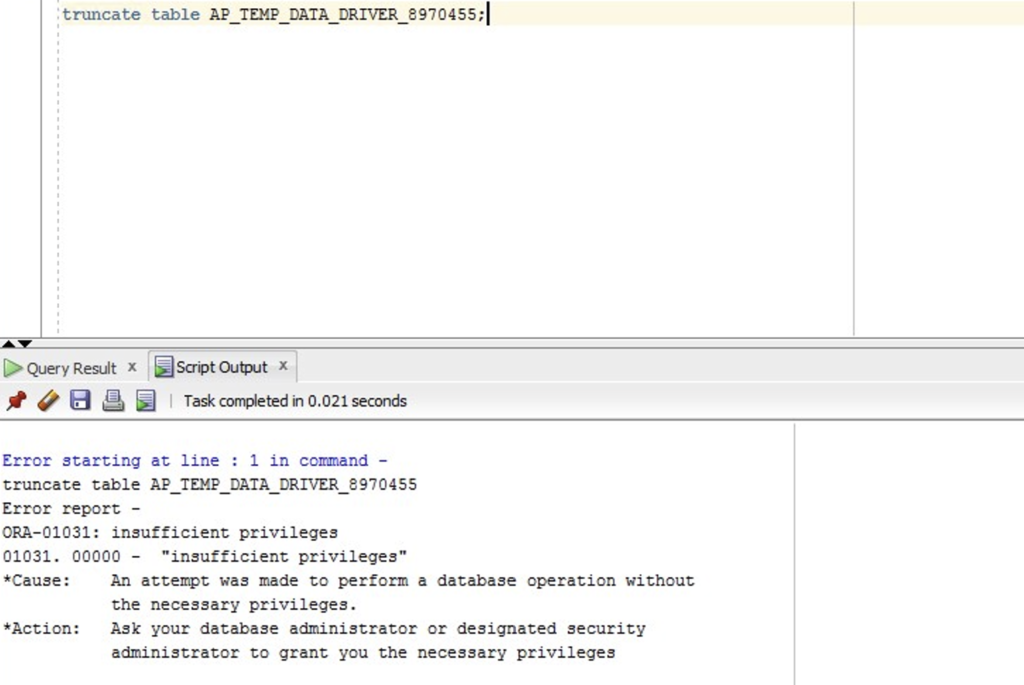
- Truncate Table
- truncate table AP_TEMP_DATA_DRIVER_8970455;
End of Post
Thanks for taking the time to read this post.
Stay tuned for the next post coming soon. . .